


_2d2230.png)
_5a42ce.png)


james.wilson
Admin
-
Joined
-
Last visited
Everything posted by james.wilson
-
is the shutter an auto close one? I would also say it shouldnt be toggle as it will stay active until a valid card is presented or rte is pressed
-
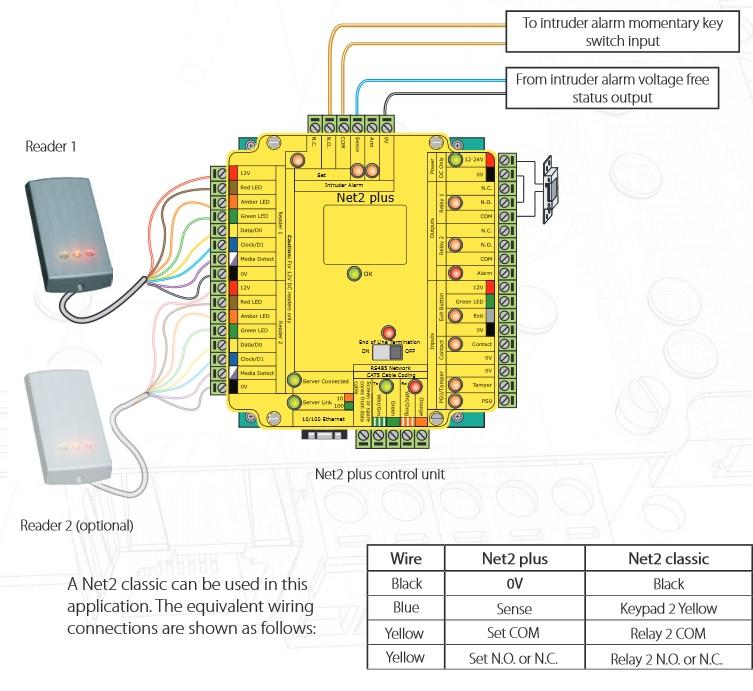
from a relay that operates when the system is armed
-
the from alarm pair is an open close clean switch to show the paxton if its armed or not. the to pair will go to a zone programmed as keyswitch momentary
-
qfa
-
it does give early warning of contact failure
-
what's fitted currently?
-
is it a contact?
-
there used to be a member here that loved them. Bound to be lots in search
-
-
-
id say its too much of a commute..but I'm sure Pete will take your offer seriously
-
ouch
-
not obliged to, Op you should crash and program as you see fit to the clients requirements. Never take on old programming who knows what was the requirements then.
-
elbows, is that a boom, and arse the fecking about with towers?
-
iPaf is booms etc
-
it could be anything, i can suggest 4 random numbers if that will help?
-
as above check there is power at the keypad. Sounds like it probably does.
-
It would appear to be power but you would need to check if the power is there on the cables
-
Sounds like a failed keypad got a picture of it?
-
Cant waive your statutory rights so would need to wait 12 months.
-
-
Pete, dont bully your point
-
-
cost of ownership
-
id also say dell are Lexmark but with lower coo

