_2d2230.png)
_5a42ce.png)

MrHappy
Global Moderator
-
Joined
-
Last visited
Everything posted by MrHappy
-
Commet Pir ?
-
w/o digging a book out.... IIRC the rkp & expander where on the same data bus & need a 5th wire for rkp sounds ? Abacus used to use funny resistor values & could have spilt zones (a&b) via resistor vaules or "peardrops" There was an 6/14 with a knacked rkp + expander kicking around my unit floor the other month
-
made if you made the effort & fitted a few more jobs they'd still be here....
-
-
TBH I never used any of them but its shame MDT / Advanti failed...
-
I've pulled out an led avanti & a radio changer force 10 alarm...
-
they look very samey, but I assume unrelated ?
-
3/8" x 6 pozi pan head ? anything which fits will be fine
-
most who post on TSI have worked in the trade, 99% of the stuff sold in the shops as "alarms" is tat, if was half decent it would be fitted to the shop... readily available hybrid alarm texecom premier readily available wired alarm texecom veritas not sure that's me..... but you did reply with "tat" & "refund" so I guess it must have been ?
-
Send it a text instructing to it change no.
-
sorry it don't support a chime on setting,
-
printerland, state price per print & the toner pages count & drum cycles without having to look at the spec sheets.... the sweet spot is £100-£150ish for mono, cheap is too cheap & going dearer they'll designed to print every document I'll do in year in week...
-
£100+vat appear about the right sort of money, I'll never print enough to wear the drum out I assume the Dell was around this price point, I was buying toner for it in 2017 but have no idea where the machine came from or how much I paid On genuine ink the Lexmark mono lasers with 10k mono cartridges offer low cost per page, But I'd wince at big toners coming in at 1.5 of the machine
-
My Dell E310dw has been pissing me off for a bit, with poor paper pick up, cleaning rollers helped but its not great. Its only done 6500 pages & has 5000 pages left in the drum... It been run on generic toner from amazon, the printer is a rebranded Brother. Before I kick it across the carpark,- has anyone had an Oki ? https://www.printerland.co.uk/product/oki-b412dn/135140 generic 3k toner is £22 v £80 for 3k oki
-
I'd assume this has come from amazon / ebay or paid for with paypal, OP its tat ask for refund
-
Having googled "Owsoo alarm" response does'nt look that bad....
-
it will stop ringing at some point...
-
I think its just a shock, there's optional mounts to cover keyhole but I don't think it magnetic?
-
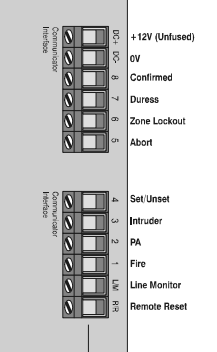
input, removes bell delay when there's a telephone line fault
-
no, we did have some on 8440's or those csl digi's there really was'nt much n the way of space or current...
-
fixed (irrc) anticode reset too.
-
r8+ has 8 channels, line monitor & remote reset
-
Somebody spent £100's to put the 24hr circuits on the gun cabinet, The little thing marked redcare is probably just a block terminal... The alarm is always working... there's set & unset but no off
-
-
Call me crazy... Did you get in touch with the installer / maintainer of the security system & ask them to train you on how to use the alarm correctly ? Maybe when they undertake the maintenance visit, update the kekoholder ect...