_2d2230.png)
_5a42ce.png)

MrHappy
Global Moderator
-
Joined
-
Last visited
Everything posted by MrHappy
-
I had also had a glass place, Large workshop no detection 9448 or similar in an office block, equally crap fire alarm... Thomas Higgins letter than ccj for a few hundred quid of work (iirc)
-
Just don't... the basic stuff is the hardest because there's no proper logs or diagnostics, Something like a euro mini would say something like Fuse Failure 100 31/05/24 11:30, Silenced by user 1 31/05/24 11:33 You then replace the fuse, note the landing sensor does not light up, look in the loft to find a rat has chewed the wire or whatever Alarms are a massive pain the balls, don't get involved.... I regret getting involved In the words of Zammo Maguire - Just say no...
-
don't get involved in another one,.... When purchasing a house they or their solicitor should have the common sense to have the vendor declare the alarm working or not, ideally providing a service report dated within the last 12 month. Control, cable or device - Controls, does the controls have 12 volts on the aux supply ? (check fuse?) Device, does the device have 12 volts present to power it Cable, does the power cable have low ohms when made into pair. same for tamper & 12hr circuit. & high ohms between every other pair ? Why do I say don't get involved ? Who do you think there are going to ring on an evening or weekend when there alarm won't set, bleeps too much, does not bleep when it should bleep..... YOU Find a local proper alarm co. or tell the end user to find one
-
Apart form the 5 csl devices I have in place 😉
-
don't get involved in alarms is best advice I can offer... do you have 12v dc at every pir, have you checked the fuse...
-
I just reposted what I had seen elsewhere, however - I never knew they had bought Chiron, however I can't think of anyone who used Chiron...

-
appeasr the alterative to redcare might just be.... redcare ? https://www.addsecuregroup.com/newsroom/addsecure-enters-the-uk-alarm-signalling-market-to-continue-bt-redcare-services/
-
Small scale manufacture pre 1970's would probably be on breadboard ? There are chunky but modern looking resistors & capitors. All components are marked in white text along Co. Name & model no.. Use of slotted screws say built up without power tools A 4x4 box is very heavy duty or predated the plastic alarm cased detection of the 1980's ? I've never seen one before or heard of the co But item would have probably been in warehouse or similar & probably quite pricey in it's day
-
Looks 1970s to me ?
-
I assumed spam, but looks like good info
-
Do they have JD Weatherspoons?
-
Off thier tits on Halal Carlsberg ?
-
The president of Iran dead wrapped in a blanket- The bloke from verisure still appears to be trying to sign him up ?

-
Congratulations on being our latest alarm expert & welcome to the moderation team....
-
As I understand it a a switch mode power supply switches on & off this is what I assume you are seeing on a scope ? Texecom has been around nearly 40 yr & turn over nearly 40 million, My stuff works, yours system despite your test equipment & qualifications doesn't ?
-
Sorry I disagree- I've never had any reason to use an oscilloscope on an intruder alarm nor do I need a £500+ multi meter (it would only get lost or broken out in alarm land) Aged 17 or so I knew something like a 9600 required a power supply to run all 16 zones & multiple keypads & speakers Who would have guessed more than 30 years later I'd still be having conversations with people who don't understand the basics principles, Suitable current in day & alarm, suitable voltage at each device when running off the battery, if you've not got this you'll have problems Your alarm appear to have lots of problems I've got lots of alarms with very few problems, its funny old world isn't it ?
-
Me? I think there horrid things to work with- I had to ring risco the other week to find out how to toggle the channels to test a dualcom Beyond paying me to stand there in person & press buttons whilst swearing at the alarm until it works the only support I can offer is moral support.... @naeem7861 you can do it son ! The full manual is online, if you don't do alarms it probably makes more sense as I have a preconceived idea of how things should work & this is an Israeli product targeted at North America ?
-
25+ year old cables, 20year old expanders, cable length, water in man holes, length of time its measured ? its not a problem site,, so never tried to fixe it.
-
I would normally wire intruder alarm data in belden, daisy chained, screened to cabinet (normally 4mm machine screw & nut, floating at last device
-
spikes killed them, I've done PE24's between Edinburgh & London this yeat & don't go back I also do Euro's & Orisec & don't have ay real issues with anything. Al doesn't do Texecom using more exclusive equipment...
-
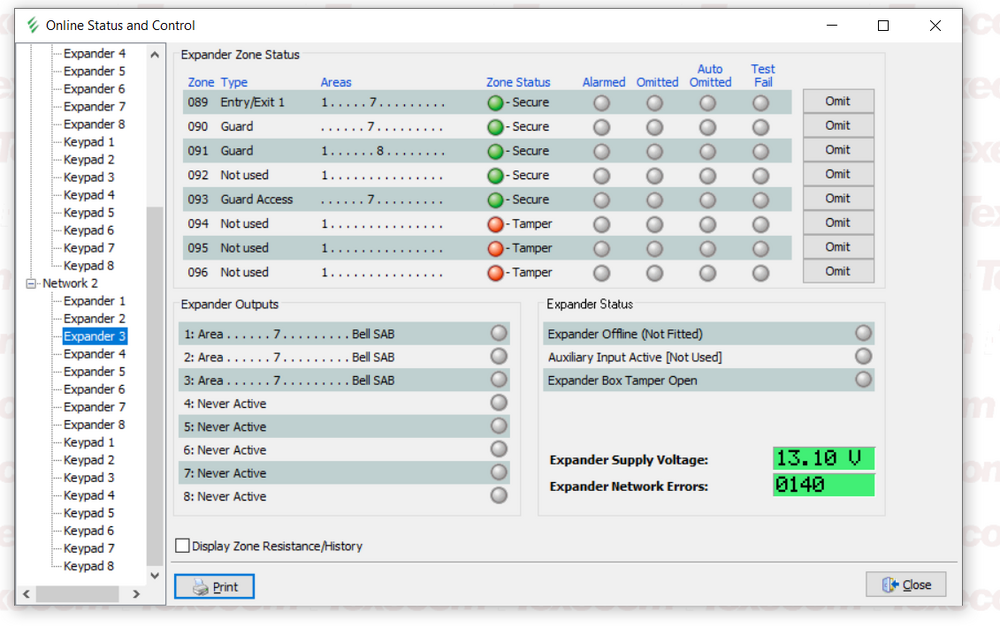
- PE 168, now much smaller system than it was for 20 years as a P168, each building has at least 1 psu, cables run under the public roads
-
Every possible measurement needed to commission and diagnose an intruder alarm can be done with multimeter If you have property large enough to need 5 expanders & lots of expensive test equipment I would assume some with your qualifications & talent could earn more more doing your own job & pay a proper alarm co. to provide a working complaint system rather faff around wasting time & money doing it poorly.
-
As I understand it the PSU comes from Elmdene, when they failed they just stopped producing voltage. Compare it the ones o your the PSU2000XP's ?
-
I've got lots of it in the field, the oldest premiers are over 20 odd years, But the 2.5A of power is at 12v ? Chances are 5 extensions speakers will be almost all the current of the system !
-
Roughly speaking the controls will power- Its self & some detection devices 1 external sounder 1 keypad 1 extension speaker 1 communicator Maybe a 2nd keypad or an expander with mostly contacts on it It will probably need a 9ah battery to have the correct amount of standbay time