_2d2230.png)
_5a42ce.png)


PeterJames
Admin
-
Joined
-
Last visited
Everything posted by PeterJames
-
The Grade of a system is defined by the lowest graded component so if you fit a grade 2 component the system will be G2
-
The whole idea of meter readings is to check the the circuit is what its expected to be, so I would use a meter on the circuit. If its wired wrong or the wrong resistor has been used or there is short on the cable. You could meter a spare pair of wires but it wont pick up if you havent done the screws up on a door contact
-
Intruder would be program, walk test, and check that items are installed to the specification and properly. If monitored, set up monitoring and test with ARC. Meter readings would be each circuit resistance, quiescent current consumption, battery current, current consumption in alarm, and calculate that the battery is an adequate size. Do the same with any PSU's. Check the bell voltage and that the holdoff is working (for longer than 10 seconds, in case the engineer has left the engineers link on the bell) charging current to the bell. If there is signalling equipment check its earthed, if it is separately housed, check any cabling between the CPU and the STU are mechanically protected, check the current readings as above. All meter readings should be done using a calibrated company multimeter. Note bell delay time (if applicable) Note Bell ring time Note entry time & exit time Number of Rearms Linefault monitoring Set the alarm fully and test entry exit is working as it should, set alarm fully and activate alarm system intruder and confirmed intruder, if there are panic buttons test them by pressing them while in day mode. Check with ARC that they recieved all signals in the order that they should have been sent. Handover should note any changes to the specification, all paperwork such as user manual certificates, and it should say that the customer has been shown how to use the alarm system and has a master code or fob, and that thy know how to add new users. I think I have covered everything for intruder. CCTV is a bit different NSI expects us to use a rotakin Fire is quite a bit more involved
-
Hi Cieska For starters are we talking intruder, or fire, or CCTV, or Access, or gate automation? Each have there own set checks, tests, and meter readings.
-
Commissioning is programming, testing, meter readings, paperwork, and handing over, but for smaller companies it sometimes means 2nd fix as well.
-
It should be easy enough to default, and most engineers worth their salt should be able to default it. But there is the rare off chance that it is locked, so noone could guarantee to default it, but it would be rare if they couldn't. ADT have different codes for different areas so you would need a local ADT engineer, if you could find one within your budget that is.
-
I thought it was a typo, or lack of understanding of current values the mains fuse would be higher than 250mA. I was right, Steve has confirmed that it is the PCB fuse which would not have been influenced by the hedge trimmer, unless she was trimming the carpet and caught the cables underneath or trimming around the bell box LOL
-
Mains tripping would not have caused the aux 12v fuse to have blown Steve, the mains fuse situated by the incoming mains maybe. But any of the fuses on the main PCB are protecting the PCB from short circuit and mains tripping would have no influence over them.
-
I suspect that they wont recommend another brand LOL but they may well recommend someone in your area
-
There should be a fused spur by the panel, if not there is also a mains fuse behind the control panel pcb, where the mains comes in. Can the cats get within six foot of your existing detectors? The Gardtec panel is old, and they have never been the best panel. But I am not so sure that other panels are much easier to install, programming wise the 595 is very simple in comparison to many. Newer panels have more features yes, but the more the features the harder it is to program. As for your no-show, there are several alarm companies out there, I would recommend you look for an approved co, I am not saying that one-man-bands are no good, there are many on here that are proper chaps. But what I am saying is if you use a company that has gone to the trouble of getting accredited they are more likely to show up when they say they will, do what they say they will do, and charge what they say they will charge Pop your postcode in on here https://www.nsi.org.uk/ or ssaib.co.uk
-
QFA If you need an alarm that wont go off for no reason or if you cats jump at the window then you need to get someone that knows what there doing to sort it out for you. Its not something that you can seek help with on a forum, a pro would need to see the property where the cats are likely to jump and be detected etc. I wouldn't bank on the battery being the cause of your sounding problems either, it probably has a contributing factor but its unlikely to be the main cause. My advice would be disconnect it all inc external sounders, as you're not using it anyway. Either or get someone in that knows what they are doing and get it sorted properly.
-
Although I agree with swb I wouldnt rush back to the shop just yet give it a test, it may have been decommissioned because the house was empty and the power was off a few years after it was installed, and never been used till now the sounders will probably not work due to someone decommissioning them at the sounder
-
Dont take this the wrong way but you need to get some basic electronics knowledge before you start playing around with stuff you dont understand. I gave up because you dont have any idea of what people are trying to explain.
-
I give up
-
If you use a power supply you have to common up the ov
-
Either the sounder doesnt work, or the panel isint outputting 12v. If you have wired 12v and gnd and the wired bell to gnd it should have sounded
-
Maybe the panel relay is knackered or the bell its hard to say without looking if yo move the wire frome N/O to common does the bell sound?
-
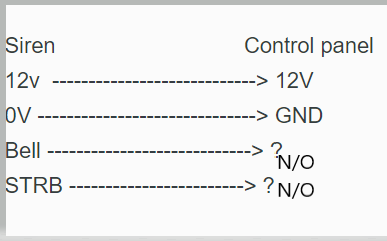
Common on the control panel (CPU) links to ground
-
I would guess, 12v and GND on CPU to 12v and 0v on bell, put a link from GND on CPU to COM then wire N/O to B on Bell
-
The siren need permanent 12v
-
Never heard of a wolfguard doesnt look like it has a tamper return, the bell needs a negative trigger that I would guess you can get from N/O on the panel; and adding OV to common
-
When was that?
-
either that or a short between tamper and one of the alarm circuits, so maybe cable
-
You just said I have a piece of string, how long is it? in order to help you we need proper info like. What have you replaced it with? what lock is in situ? how have you wired it?
-
I think that would be very thin ice, I think the training would have to be non hands on in other words not making any money for the company you work for. Again that company must not be doing anything for the company you work for