


_2d2230.png)
_5a42ce.png)

satsuma01
Trade Full Member
-
Joined
-
Last visited
-
? looks like we will be going back to old fashioned security tapes then ?
-
Hi regarding the galaxy flex 20 panel setup if you do the following to put the wired Rio onto the system it works first time Address Rio as 2 Address keypad as 3 and above Make sure rf Rio in menu 56.60.1 is disabled Rf Rio will show as 102 but wont see it active Exit engineering mode to check for tampers and any additional mods Once system found new Rio give system a restart to save config and refresh the system The extra zones 1021 to 1028 will be seen and active fir new detectors to be wired/added Apologies that this thread is older but thought it was relevant to the same topic
-
But the op could put a grub screw to lock the unit in place using an allen key type grub
-
satsuma01 changed their profile photo
-
Happy new year to everyone here all the best hope. 2021 brings better luck for. All. Members here regards Colin
-
i fit texecom, honeywell galaxy, as they are the main panels i trained on in a couple of security companies in the past, but in truth any trades person can change into another trade as long as they fully learn and understand the installation setup in any area, it shouldnt be a case that trades feel once your a trade you need to only do that if you want a different change in life go for it, but just fully understand and learn the trade fully on the correct routes to your qualification levels.
-
maybe the fusebox was not operating or the op may have work done which required rcd protection, or it could be like me i moved ours 3 years ago didnt reinstall the old one in new location but installed a full rcbo board instead.
-
Hi I've been asked by a client about the touch screen galaxy honeywell cp040-01 touch screen alarm. Keypad does anyone know if this keypad is suitable and able. To. Be installed to. Their galaxy g2 20 panel its using the mk7 keypad at the moment many thanks
-
Let the guys here know your area and maybe one of the guys could price it up whos local to you
-
No no silicon require there's a rubber seal around the edge inside on the cover grove
-
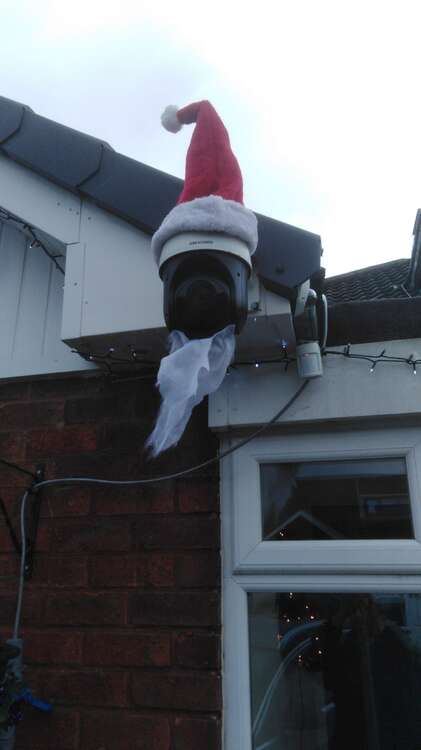
It's a honeywell pet sensor sealed and works great makes the dome move up. The drive if there's someone about and there ones by the door gate side etc all around the bungalow
-
You better watch out You better not. Try You better not thieve I'm. Telling you why Santa cam is watching in town Its writing its log And backing up twice It's going to find out If you've been naughty and nice Santa cam is watching in town It sees you when you are prowling It watches you at night It sees you steal that Christmas tree It's red eyes give a fright You better watch out You'd better not try You better not thieve I'm. Telling you why Santa cam is watching in town Beard idea from my partner santa hat was. My idea
-
Ok and who would need to do thatIt's all one yard and building but they are expanding into a new trade counter from the old one and need to know if they require a fire alarm installing into their premises I have said they do as public are entering the centre Do you know the area coverage per smokeDoes anyone know where a builders yard with a public and trade counter stand with regards to fire protection within the premises do they require a fire alarm installing within the trade area center and warehousing connected to the trade centre


Important Information
By using this site, you agree to our Terms of Use.