Skip to content
View in the app

A better way to browse. Learn more.

Security Installer Community

A full-screen app on your home screen with push notifications, badges and more.

To install this app on iOS and iPadOS
  1. Tap the Share icon in Safari
  2. Scroll the menu and tap Add to Home Screen.
  3. Tap Add in the top-right corner.
To install this app on Android
  1. Tap the 3-dot menu (⋮) in the top-right corner of the browser.
  2. Tap Add to Home screen or Install app.
  3. Confirm by tapping Install.

Hello

Featured Replies

My name is jack and I like alarm systems specificly vintage ones since that have more history, look better and rarer. 

Hi Jack

Welcome

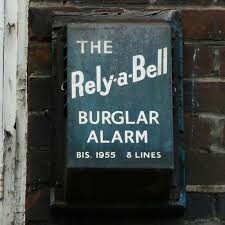
Love the picture, there are one or two young people that are into collecting old alarms on here.


Pic is from Burglar Alarm Britain (I assume), worth a visit, also assumed you had.

Edited by datadiffusion

So, I've decided to take my work back underground.... to stop it falling into the wrong hands


6 hours ago, datadiffusion said:

Pic is from Burglar Alarm Britain (I assume), worth a visit, also assumed you had.

Nah, more like peters new bellbox

No need to be sarcastic, I have on good authority his boxes use electric bells now, so no need for a miniaturised steam plant with every system anymore.

So, I've decided to take my work back underground.... to stop it falling into the wrong hands


10 hours ago, datadiffusion said:

Pic is from Burglar Alarm Britain (I assume), worth a visit, also assumed you had.

I havent looked at her page for some while now, since she dropped her FB page

She still has her FB page and I am still on it but I dont get the updates?

No new updates for about a year now, ours was published posthumously and has been nothing since.


https://burglaralarmbritain.wordpress.com

So, I've decided to take my work back underground.... to stop it falling into the wrong hands


defence is one

phil was in the Algarve had to come home 


securitywarehouse Security Supplies from Security Warehouse

Trade Members please contact us for your TSI vetted trade discount.

I agree with Mike... 

Nothing is foolproof to a sufficiently talented fool.


Create an account or sign in to comment

Recently Browsing 0

  • No registered users viewing this page.

Important Information

By using this site, you agree to our Terms of Use.

Account

Navigation

Search

Search

Configure browser push notifications

Chrome (Android)
  1. Tap the lock icon next to the address bar.
  2. Tap Permissions → Notifications.
  3. Adjust your preference.
Chrome (Desktop)
  1. Click the padlock icon in the address bar.
  2. Select Site settings.
  3. Find Notifications and adjust your preference.