Skip to content
View in the app

A better way to browse. Learn more.

Security Installer Community

A full-screen app on your home screen with push notifications, badges and more.

To install this app on iOS and iPadOS
  1. Tap the Share icon in Safari
  2. Scroll the menu and tap Add to Home Screen.
  3. Tap Add in the top-right corner.
To install this app on Android
  1. Tap the 3-dot menu (⋮) in the top-right corner of the browser.
  2. Tap Add to Home screen or Install app.
  3. Confirm by tapping Install.

Kerry springs rely a bell

Featured Replies

39 minutes ago, Jack b said:

Does anyone know what a kerry spring is and how to make one?


add fruit flavorful & carbonate 


kerry%20spring.jpg

Edited by MrHappy

Mr th2.jpg Veritas God

2 hours ago, Jack b said:

Does anyone know what a kerry spring is and how to make one?

I think the Peckham spring is a direct replacement 


IMG_0266.JPG.9b45f13236427d70f8aa7a056e2ca368.JPG

  • Author
2 hours ago, MrHappy said:


add fruit flavorful & carbonate 


kerry%20spring.jpg

How would I hook it up to a panel?

8 minutes ago, Jack b said:

How would I hook it up to a panel?


remove cap & pour...

Mr th2.jpg Veritas God

27 minutes ago, Jack b said:

How would I hook it up to a panel?


Just leave it in the battery tray for the next engineer to deal with...?

  • Author
25 minutes ago, MrHappy said:


remove cap & pour...

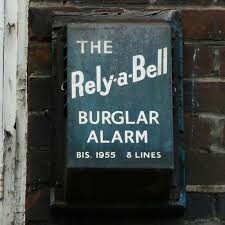
In all seriousness what do kerry springs even look like? The reason I'm asking is because I've made a panel for the Rely-A-Bell I picked up and It needs some way of sounding the alarm through the panel. I know door contacts work but I need something a bit more authentic.

Create an account or sign in to comment

Recently Browsing 0

  • No registered users viewing this page.

Important Information

By using this site, you agree to our Terms of Use.

Account

Navigation

Search

Search

Configure browser push notifications

Chrome (Android)
  1. Tap the lock icon next to the address bar.
  2. Tap Permissions → Notifications.
  3. Adjust your preference.
Chrome (Desktop)
  1. Click the padlock icon in the address bar.
  2. Select Site settings.
  3. Find Notifications and adjust your preference.