Skip to content
View in the app

A better way to browse. Learn more.

Security Installer Community

A full-screen app on your home screen with push notifications, badges and more.

To install this app on iOS and iPadOS
  1. Tap the Share icon in Safari
  2. Scroll the menu and tap Add to Home Screen.
  3. Tap Add in the top-right corner.
To install this app on Android
  1. Tap the 3-dot menu (⋮) in the top-right corner of the browser.
  2. Tap Add to Home screen or Install app.
  3. Confirm by tapping Install.

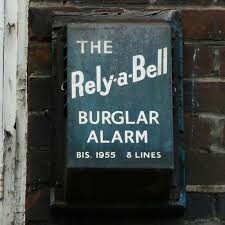
Maxim Burglar Alarm

Featured Replies

1 hour ago, TOKswitch said:

John Mitchell passed away 4 or 5 years ago not recognised for his contribution to the Industry & the NSCIA over the years, his wife Cathy still lives in Kirkintilloch near Glasgow


**engage stalking mode**


https://burglaralarmbritain.wordpress.com/2011/05/03/maxim-and-enright-southwark/


https://www.glasgowtimes.co.uk/announcements/deaths/deaths/15642342.John_Mitchell/


PS welcome to TSI

Mr th2.jpg Veritas God

  • Replies 23
  • Views 34.8k
  • Created
  • Last Reply

Top Posters In This Topic

Most Popular Posts

Posted Images

As above welcome

Been better if you were the man himself but welcome

securitywarehouse Security Supplies from Security Warehouse

Trade Members please contact us for your TSI vetted trade discount.

  • 7 months later...

Hello I use to work for Maxim Alarms

and use to install these systems they use to have a six volt battery in that bell cover

and a piece of plastic capping coming down the wall to a toke lock in a box where 

we’re you would set they alarm 

  • 1 year later...
  • Author
On 21/02/2023 at 21:37, Ianfrost said:

Hello I use to work for Maxim Alarms

and use to install these systems they use to have a six volt battery in that bell cover

and a piece of plastic capping coming down the wall to a toke lock in a box where 

we’re you would set they alarm 

Any recollection on the SCB module inside the maxim alarm box's? I was told ages ago that it was a small transistor module fitted underneath the alarm bell?

Create an account or sign in to comment

Recently Browsing 0

  • No registered users viewing this page.

Important Information

By using this site, you agree to our Terms of Use.

Account

Navigation

Search

Search

Configure browser push notifications

Chrome (Android)
  1. Tap the lock icon next to the address bar.
  2. Tap Permissions → Notifications.
  3. Adjust your preference.
Chrome (Desktop)
  1. Click the padlock icon in the address bar.
  2. Select Site settings.
  3. Find Notifications and adjust your preference.