Skip to content
View in the app

A better way to browse. Learn more.

Security Installer Community

A full-screen app on your home screen with push notifications, badges and more.

To install this app on iOS and iPadOS
  1. Tap the Share icon in Safari
  2. Scroll the menu and tap Add to Home Screen.
  3. Tap Add in the top-right corner.
To install this app on Android
  1. Tap the 3-dot menu (⋮) in the top-right corner of the browser.
  2. Tap Add to Home screen or Install app.
  3. Confirm by tapping Install.

Defensure

Trade Full Member
  • Joined

  • Last visited

  1. Hmm Gardtec. Spot on, thanks. Turns out its a Gardtec 370. I took over a newer Gardtec a few years back and that was a piece of junk. Slowly every function on the board started to fail.
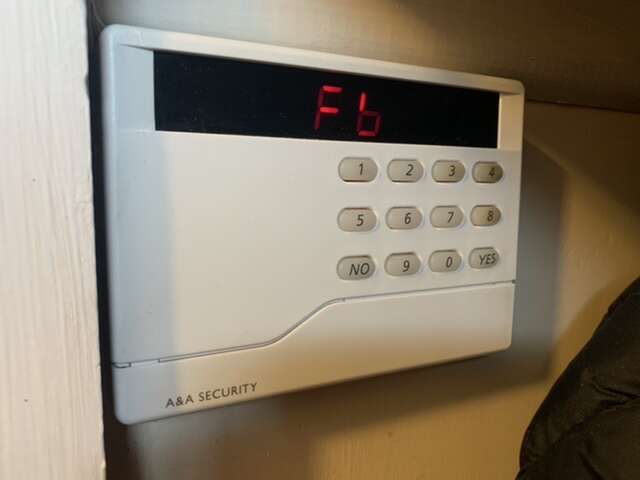
  2. Hi all I've been to look at a faulty alarm system today and I've no clue to the manufacturer and mode of the alarm system. I think it's going to be irrelevant as getting a replacement keypad for something so old is going to be a mission, but least I can have a look once I know what the system is. cheers Luke
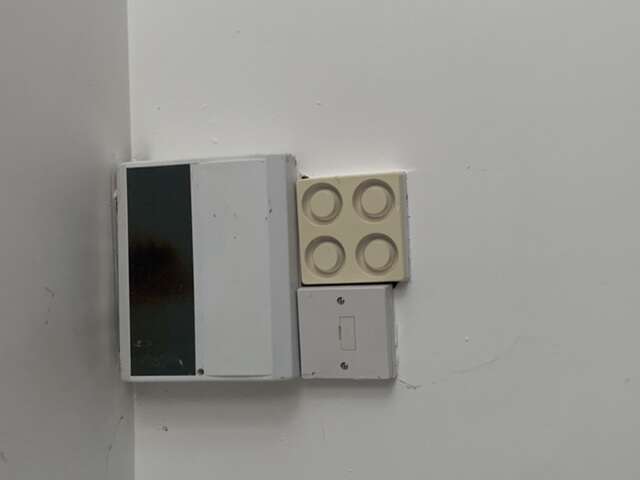
  3. Afternoon all Going to see a customers new premises and they have sent me a photo of their alarm panel prior to my visit. Any ideas what model it is? Many thanks luke
  4. Hi all I'm currently looking at a CCTV design for a cemetery. Unfortunately it'e one of the edge of town cemeteries as a result of the churchyard full to the brim, and therefore theres no electricity. The customer would like a wireless battery system, but for what they want it for I don't think its going to work. They do have a shed which the NVR is likely to be located, and its got a decent sized roof for a solar panel, so I'm looking at a Solar solution to provide a 12V supply with a battery capacity for 18-24hrs backup. I'm aiming to use a low power NVR with built in POE, or a separate switch depending on power usage (seems like every Watt is going to count), and an LED monitor for playback. Currently got a couple of companies I want to contact for prices and designs, but thought I would see if anyone here has done anything similar, and if so who they used, and any feedback of the system. Many thanks Luke

Account

Navigation

Search

Search

Configure browser push notifications

Chrome (Android)
  1. Tap the lock icon next to the address bar.
  2. Tap Permissions → Notifications.
  3. Adjust your preference.
Chrome (Desktop)
  1. Click the padlock icon in the address bar.
  2. Select Site settings.
  3. Find Notifications and adjust your preference.