

Skip to content
View in the app

A better way to browse. Learn more.

Security Installer Community

A full-screen app on your home screen with push notifications, badges and more.

To install this app on iOS and iPadOS
  1. Tap the Share icon in Safari
  2. Scroll the menu and tap Add to Home Screen.
  3. Tap Add in the top-right corner.
To install this app on Android
  1. Tap the 3-dot menu (⋮) in the top-right corner of the browser.
  2. Tap Add to Home screen or Install app.
  3. Confirm by tapping Install.

Ranson

Member
  • Joined

  • Last visited

Everything posted by Ranson

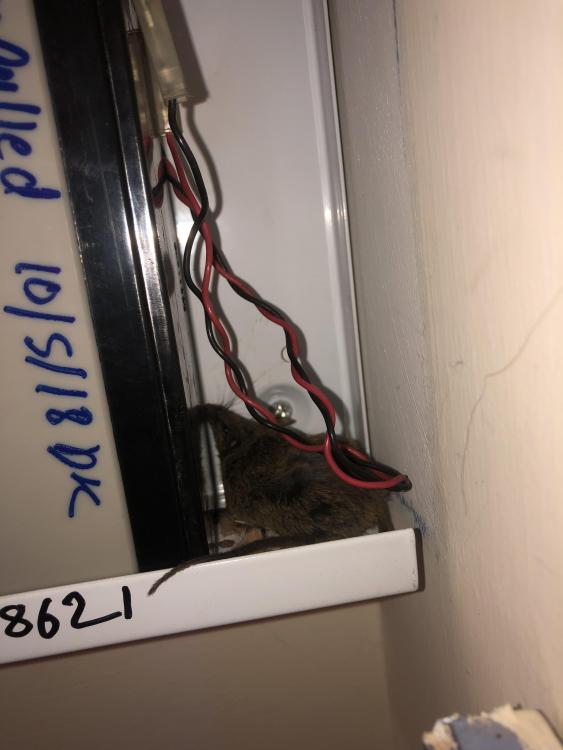
  1. I was recently on a job and as I walked into the kitchen I was hit with that smell of death , it wasn’t till I opened the panel that I realised where it was coming from
  2. Guard hall px48i?
  3. Old scanny 9100
  4. Can’t beat a wire , I would ask them if they could install a texecom hybrid system
  5. Engineer code /master code can easily be defaulted anyway with out defaulting the whole panel so it’s not a big issue even if they don’t give you the engineer code

Important Information

By using this site, you agree to our Terms of Use.

Account

Navigation

Search

Search

Configure browser push notifications

Chrome (Android)
  1. Tap the lock icon next to the address bar.
  2. Tap Permissions → Notifications.
  3. Adjust your preference.
Chrome (Desktop)
  1. Click the padlock icon in the address bar.
  2. Select Site settings.
  3. Find Notifications and adjust your preference.