Skip to content
View in the app

A better way to browse. Learn more.

Security Installer Community

A full-screen app on your home screen with push notifications, badges and more.

To install this app on iOS and iPadOS
  1. Tap the Share icon in Safari
  2. Scroll the menu and tap Add to Home Screen.
  3. Tap Add in the top-right corner.
To install this app on Android
  1. Tap the 3-dot menu (⋮) in the top-right corner of the browser.
  2. Tap Add to Home screen or Install app.
  3. Confirm by tapping Install.

Combat Alarms

Featured Replies

2 minutes ago, Jack b said:

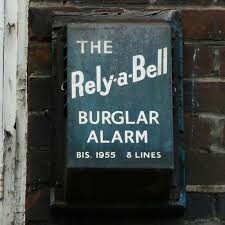
Does anyone know the original colour of a Combat Alarms box?

Screenshot_20200605-190919_Samsung Internet.jpg

I seen one of these before 

It was a dark brown (almost black colour)

  • Author
Just now, Logan said:

I seen one of these before 

It was a dark brown (almost black colour)

Ive seen something like that before.

It was painted over though.

Create an account or sign in to comment

Recently Browsing 0

  • No registered users viewing this page.

Important Information

By using this site, you agree to our Terms of Use.

Account

Navigation

Search

Search

Configure browser push notifications

Chrome (Android)
  1. Tap the lock icon next to the address bar.
  2. Tap Permissions → Notifications.
  3. Adjust your preference.
Chrome (Desktop)
  1. Click the padlock icon in the address bar.
  2. Select Site settings.
  3. Find Notifications and adjust your preference.