Skip to content
View in the app

A better way to browse. Learn more.

Security Installer Community

A full-screen app on your home screen with push notifications, badges and more.

To install this app on iOS and iPadOS
  1. Tap the Share icon in Safari
  2. Scroll the menu and tap Add to Home Screen.
  3. Tap Add in the top-right corner.
To install this app on Android
  1. Tap the 3-dot menu (⋮) in the top-right corner of the browser.
  2. Tap Add to Home screen or Install app.
  3. Confirm by tapping Install.

New System Price?

Featured Replies

I have been thinking of getting new system installed the one i have currently got is ok but would like to go to monitored what do you think on this price

The installing company is inspected by S.S.A.I.B

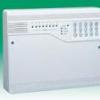
control panel and RKP

3 Dual Tec one will be Pet immune

2 Door Contatcs

2 Smoke Detectors

1 Pa button

2 Live Bell boxes

1 Digi Com

Installed for

  • Author
whats the control panel make?? ie galaxy etc

Not sure on make the system RKP, is monitored with police response and fire

Not sure on make the system RKP, is monitored with police response and fire

whats the spec for dd243 compliance?

  • Author
whats the spec for dd243 compliance?

not to sure on dd243 whats this for anyway i know system is installed to PD6662

not to sure on dd243 whats this for anyway i know system is installed to PD6662

okay whats the grading going to be

who is fitting the line box

is it a flat or house or shop

how far will the intruder get into the premises before two or more detectors activate

how will the system be disarmed on entry

theres a lot to specifiying a system and it is harder when police response is a requirment too the best advise i would give is to get at least three quotes from approved installers then ask again on the comparisons and differences

angus

As a SSAIB installer the price seems ok for a residential grade 2 with no in room conformation. But as stated all alarms are site specific. Just check that you are getting the proper maintenence ie a minimum of 1 remote and 1 on site in a 12 month peroid.

Archived

This topic is now archived and is closed to further replies.

Recently Browsing 0

  • No registered users viewing this page.

Important Information

By using this site, you agree to our Terms of Use.

Account

Navigation

Search

Search

Configure browser push notifications

Chrome (Android)
  1. Tap the lock icon next to the address bar.
  2. Tap Permissions → Notifications.
  3. Adjust your preference.
Chrome (Desktop)
  1. Click the padlock icon in the address bar.
  2. Select Site settings.
  3. Find Notifications and adjust your preference.