Skip to content
View in the app

A better way to browse. Learn more.

Security Installer Community

A full-screen app on your home screen with push notifications, badges and more.

To install this app on iOS and iPadOS
  1. Tap the Share icon in Safari
  2. Scroll the menu and tap Add to Home Screen.
  3. Tap Add in the top-right corner.
To install this app on Android
  1. Tap the 3-dot menu (⋮) in the top-right corner of the browser.
  2. Tap Add to Home screen or Install app.
  3. Confirm by tapping Install.

Mark52

Newbie
  • Joined

  • Last visited

Everything posted by Mark52

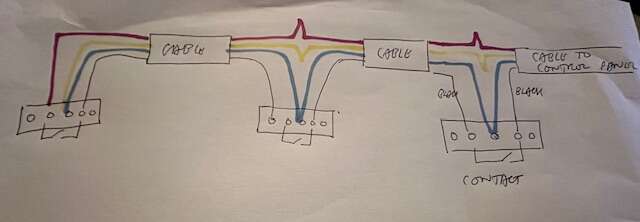
  1. I bought some better quality contacts and wired them as in my pic and so far they are working fine thanks for everybody’s help in the matter
  2. Didn’t really want to get a expander for one door contact how would I do the eol contact wiring it is 6 core would anything need doing in control panel
  3. It’s just a standard door contact
  4. I have one zone which has 2 contacts on same zone in 2 sheds I have altered one shed so it has two doors on now so I want 3 contacts i did this and it worked for a couple of days then it kept saying the door was open but it’s not so I went back to 2 contacts for now its Orisec panel

Important Information

By using this site, you agree to our Terms of Use.

Account

Navigation

Search

Search

Configure browser push notifications

Chrome (Android)
  1. Tap the lock icon next to the address bar.
  2. Tap Permissions → Notifications.
  3. Adjust your preference.
Chrome (Desktop)
  1. Click the padlock icon in the address bar.
  2. Select Site settings.
  3. Find Notifications and adjust your preference.