

Skip to content
View in the app

A better way to browse. Learn more.

Security Installer Community

A full-screen app on your home screen with push notifications, badges and more.

To install this app on iOS and iPadOS
  1. Tap the Share icon in Safari
  2. Scroll the menu and tap Add to Home Screen.
  3. Tap Add in the top-right corner.
To install this app on Android
  1. Tap the 3-dot menu (⋮) in the top-right corner of the browser.
  2. Tap Add to Home screen or Install app.
  3. Confirm by tapping Install.

Lou

Newbie
  • Joined

  • Last visited

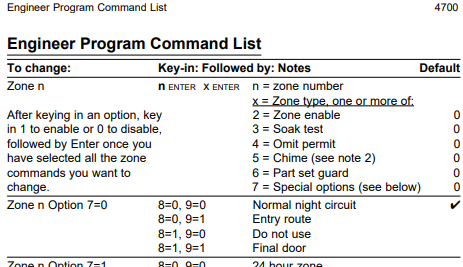
  1. Thank you for your reply. So what keys would you hit to make Zone 2 an entry route. I have tried 2 enter 708091 without success. What should it be?
  2. Hi, i have a Scantronic 4700 alarm which i have had for many years. I have had to restart the system which involves reprogramming the zones. I am having problems with understanding option No7. I did it before but cannot remember how. Can anyone advise please, i have wasted too much time on it. All of the other programming understandable, 7 isn't.
Important Information

By using this site, you agree to our Terms of Use.

Account

Navigation

Search

Search

Configure browser push notifications

Chrome (Android)
  1. Tap the lock icon next to the address bar.
  2. Tap Permissions → Notifications.
  3. Adjust your preference.
Chrome (Desktop)
  1. Click the padlock icon in the address bar.
  2. Select Site settings.
  3. Find Notifications and adjust your preference.