


_2d2230.png)
_5a42ce.png)

donut
Member
-
Joined
-
Last visited
Everything posted by donut
-
-
have you had a look on this thread?
-
This probably answers my question 1 - PART 1 OMIT Zones with this attribute will be omitted when ‘Part Arm 1’ is selected. Zones without this attribute will respond as normal.
-
Haha, I mean to access user settings you would normally enter code, then have option to set alarm or access codes, i assume if i set auto yes, it would just go directly to alarm arm and not offer the option to set or go into user setting???? I may be totally wrong in my assumption, neighbours getting peed off alarm keep going of while I am playing with settings now. EDIT but i guess that user does not need any other need to access those settings in which case it will work, just set up a guest user, give auto yes option to them. Like so ( just add a prox tag to it)
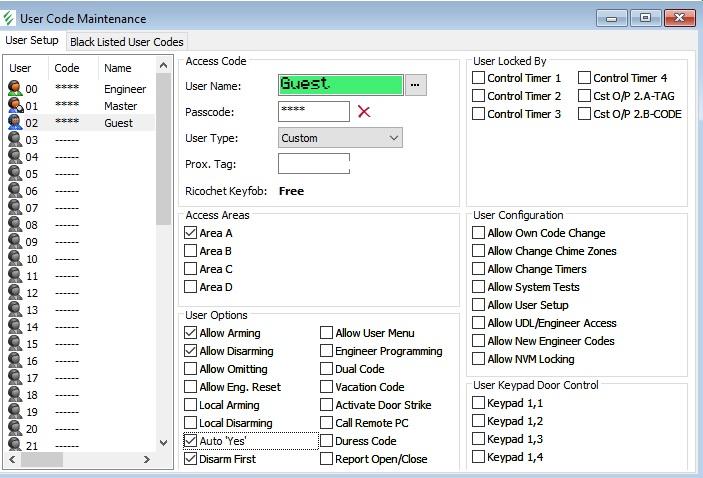
-
I'm guessing you could not do what I am thinking of, otherwise you would never be able to access any other settings from keypad, it would just go into armed state?
-
If i would like a prox tag for one user, so that they just show the prox to reader to arm and disarm without any further need to do anything, does under user- enable "auto yes" have to be selected, is that what this is for? Currently I have to show it twice to arm and twice to disarm
-
Does the wireless keypad have a DIP switch anything to do with that?
-
I have installed the alarm and programed including adding a smartcom wifi. My question is, currently i have all my pirs assigned to one zone. If I want to part arm the system at night, thereby not having upstairs pirs active, how do i do this in programming . I am using wintex. Is it to do with ticking part emit 1 on those sensors?
