_2d2230.png)
_5a42ce.png)

phily41
Member
-
Joined
-
Last visited
Everything posted by phily41
-
ok so ive the problem sorted i think the bell box sorted. I did what this as below and move the jumper to battery start. What I also did was put back in the front box the MSW 1 cable. Sorry I didn't take picture before I closed the unit...now both lights are flashing on both boxes , the strobes are working and alarm bells....so hopefully all sorted. The alarm will arm and all works.....big thanks to everyone with all there ideas.
-
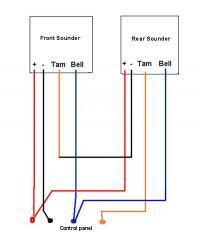
TBH Im not 100% about the front bell as it was late and couldnt test it but definite know the strobe doesn't work. The rear bell everything works.. I have fed a cable from the front to rear through the attic to power and connect the rear box, and yes using 6 core cable as i only need 6
-
If the system is clear I think both light are to flick off and on.. the Rear does this but the front box only the left green lights up. The manual claims it's stuck in a safe mode. Would you know can you directly wire them straight into the panel?
-
I'm for sure, Ive had these boxes open and closed rechecking and rechecking. the rear box seems to be working ok, its just the front box...... I removed it today to check if it wasn't faulty and wired it straight into the panel and it was 100% working. Should I just run the Front and rear cable directly straight into the panel instead of running one from the front box into the rear box?
-
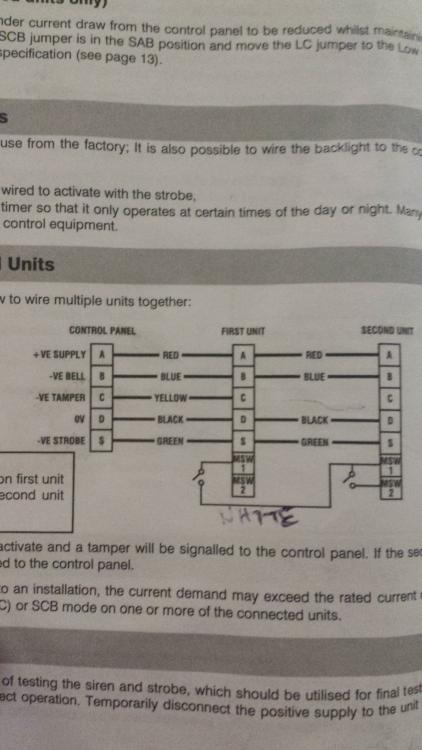
Ive basically just followed the instructions from the guide below. I have removed Tamper wire from MSW 2 on the first unit and connected 'white cable' (spare) into it....on the second unit I have connected it into MSW 1
-
Hi and thanks in advance for any advice given here. I have a texecom premier elite 24 panel. Yesterday I replaced my old bell boxes with two new Odyssey x-BE boxes. I have followed the instructions regarding wiring from the manual...but I've got a problem. FRONT bell box has left light only flashing...according to hand book it says its stuck on HOLD-OFF mode. Rear bell box has the 2 flashing light working so that box seems to be working ok. I've rang texecom support and I'm totally at a loss,,,I've been at this 2 days and checked and rechecked wiring. Could someone please give me a easy step by step guide to sort this, even a simple wiring diagram... Also what advice which jumpers to set on each box. thank you philip.