

Skip to content
View in the app

A better way to browse. Learn more.

Security Installer Community

A full-screen app on your home screen with push notifications, badges and more.

To install this app on iOS and iPadOS
  1. Tap the Share icon in Safari
  2. Scroll the menu and tap Add to Home Screen.
  3. Tap Add in the top-right corner.
To install this app on Android
  1. Tap the 3-dot menu (⋮) in the top-right corner of the browser.
  2. Tap Add to Home screen or Install app.
  3. Confirm by tapping Install.

Jackswan

Member
  • Joined

  • Last visited

Posts posted by Jackswan

  1. 44 minutes ago, sixwheeledbeast said:

    Some of the earlier model bells did this type of thing before they failed completely, not seen that with the 740.

    I only know of the mains or wirefree bell options never seen a 12v option, the expander would allow for most SCB option wired bells but you would need alarm cable.

    The system is obsolete and only one way, I would say it's not worth spending on it and to upgrade.

    The last thing I wanted to do was upgrade seeing as it is only 6 years old. Out of curiosity how much would a similar one cost now?

  2. Had a Visonic Powermax Complete alarm system fitted back in 2014. This came with the MCS-740 wireless siren, but finding that the battery only lasts a maximum of 12 months and it is becoming expensive to replace every year.
    Wondering if it is the distance of the alarm panel from the siren or whether it is the 20 inch walls between the two that is causing the quick depletion of the battery?
    Thinking whether it would be worthwhile to go for a mains powered siren that would be compatible with the Powermax? I understand that there is a Visonic expander module that clips into the main alarm box for the cost of about £18, but what siren is compatible with it?


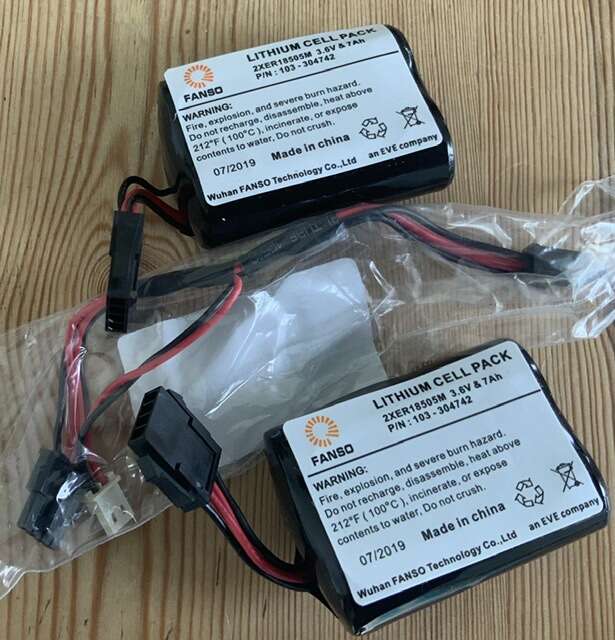
    Pictured are the new batteries ready to be fitted
    78F7C089-8F0F-46D7-A0B6-B0885556E3E0.jpeg

Account

Navigation

Search

Search

Configure browser push notifications

Chrome (Android)
  1. Tap the lock icon next to the address bar.
  2. Tap Permissions → Notifications.
  3. Adjust your preference.
Chrome (Desktop)
  1. Click the padlock icon in the address bar.
  2. Select Site settings.
  3. Find Notifications and adjust your preference.