_2d2230.png)
_5a42ce.png)

zurrieq
Member
-
Joined
-
Last visited
Everything posted by zurrieq
-
Ok... using the UDL password connects but it makes the Com-IP fault all the time. Pity there is no fix for such a useful tool.
-
I had done that but still did not work. Anyways, then I installed it through dos prompt was was quite simple. The problems is that the code is still not working as per above post. Any ideas?
-
I opted for DOS: tftp -i xxx.xxx.xxx.xxx PUT Web1.cob WEB1 which worked. In fact I can now see the Menu on the side. I enter the engineering password. When I click Online Keypad, I get the keypad indicating "Reading.......", then I get no "Access with System". Then I click something else such as System Zone Status or Event Log and I get a System Alerts on the keypad - Areas need reset and Com 1 Fault. Trid this a number of times and always get the same issue. Do I need to enable something?
-
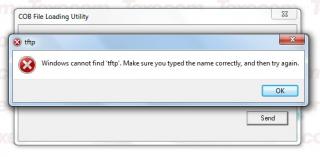
I get this error:
-
I installed 7-zip. Can open the downloaded zip file but I can only see CobLoad as 1 file inside the archive. Doubleclicking that file shows the .exe and .cob files.
-
Appreciate our efforts. I tried with winzip and with windows 7 standard ... still nothing. very strange. If you want I can share an ftp site where you can upload the files and I can zip them myself and share.
-
Invalid once again. Maybe the upload is creating a problem. Can I give you my email address?
-
This file seems to be corrupted. Can you upload again please. Thanks
-
Why doesn't texe publish the software and those who want more customisation can use the SDK? Is there a web server on the com-ip and how can ou access the server? Will I receive all these details?
-
I sent an email to texecom. Let's see what they come up with. So there is no standard web software? I have some java knowledge but not enough to write something myself.
-
I have the Com-Ip module attached to a premier 48. When I query the ip address from a web browser, I get a nice diagram and the following wording: [b]For web page examples please click here. For more information on web page applications, please contact your installation company or distributor. For information on all Texecom products please visit: www.texe.com.[/b] I tried to look in the provided CD but there is nothing in there. Anything you can share or how do you suggest to go about? I tried to contact my supplier but did not receive any reply so far (been a few weeks). Thanks