


_2d2230.png)
_5a42ce.png)
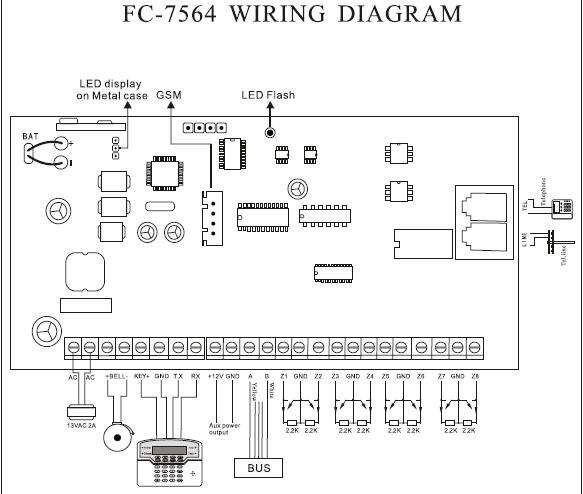


FC 7564 Wired, wireless and bus zones Alarm host

By alarmsystem
- 3,356 views
- View alarmsystem's images
Features of this alarm host:
1. 64 defense area: 8 wired, 24 wireless and 32 BUS zones.
2. 6 ways to arm and disarm the system: user code, keyfob, phone, SMS, auto timer, CMS
3. Alarm notification: When alarm occurs, user can have alarm notification by phone call, SMS
4. Can use without keypad
5. LED display on metal case, easier for user to check system information.
6. Supports 8 pcs LCD keypad and 8 wireless remotes.
7. Password: 1 installer code, 1 duress code, 15 user codes
8. CMS: 2 CMS follow me numbers, 1 account number
9. Voice Calling phone number: 4 voice numbers, voice prompting operation to answer the alarm call easy.
10. Event log: 128 event logs. events can be queried.
11. Recording: 10 seconds automatic message recording.
Recommended Comments
Create an account or sign in to comment