


_2d2230.png)
_5a42ce.png)

dave36
Member
-
Joined
-
Last visited
-
that is set to 00:00
-
I've been right through the 56 communications section which i assumed where it would be
-
the alarm was on a contract with previous owner of building, but we haven't got it on a contract.. i have tried changing and deleting number in communications/telecoms section , but i cant find any reference to this 0844 number. however its obviously in there somewhere though. It looks like it only makes the call once a day if thats any help. any advice/help gratefully received
-
Hi had this alarm set up for a while, (it was installed when we moved in ) but have noticed that on the phone bill is a call every night to an 0844 number, which is apparently an alarm test call? sounds logical, but is there any way of disabling it please?
-
thats what I've done and it works - so thanks to you all especially galaxy guy.
-
the white wire goes to a terminal just above the blue wire in the photo and both are marked T. on the panel I've put it in the far right terminal with the 0v wire.
-
Sorry, the white wire goes to the other tamper connection. However with many thanks to you all the bell and tamper are now working fine, the strobe doesn't work but its not too important. I can't see a reason as to why the strobe isn't working unless the wire is in the wrong place or it is set wrong under outputs.
-
That's great many thanks I will give this a go - where does the white tamper wire go - into the 0v ? with the black
-
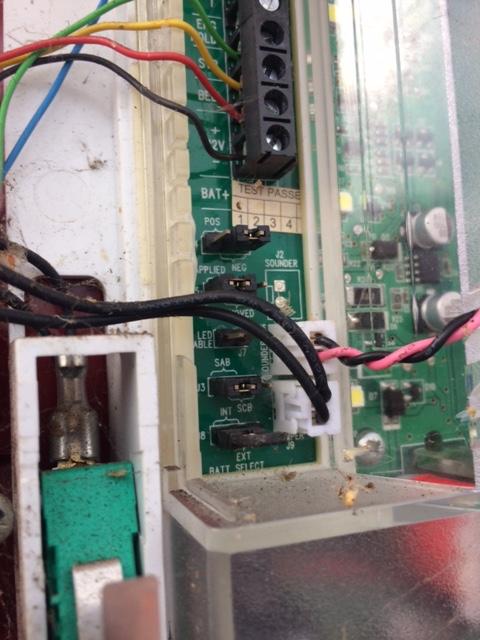
so here is the pic of the bell box, but I think its knowing where to put the wires in the galaxy 48 that the issue. Also I presume I have to program the galaxy outputs ?
-
Hi Green wire to str, yellow to bell, red and black to + and - blue and white to T under that there are some jumpers pos/neg, sab/sbc batt sel int/ext although the bell doesn't have a manufacturer on it the pcb is marked RPCB488 v H
-
Hi Hope that someone can help - I've just moved into different premises and there is a galaxy 48 on the wall, but all the cables had been disconnected. Well I've figured out the keypads and the detectors but there is a six core cable going to the bell box and I am having trouble with it to say the least! Obviously (I think) that red is +VE and black is 0v, blue and white seem to be tamper which leaves green and yellow. But when I connect them the siren either remains silent or goes off constantly. So am I connecting to the correct place? the RIO outputs, or do I need to fit resistors? Apologies if this is a stupid question. all my previous alarms were far less complicated :-)