_2d2230.png)
_5a42ce.png)

PaulCass
Newbie
-
Joined
-
Last visited
-
Yes, I will know the eng code (when I receive & install the panel that is - it's currently going around & around the DHL parcel universe).
-
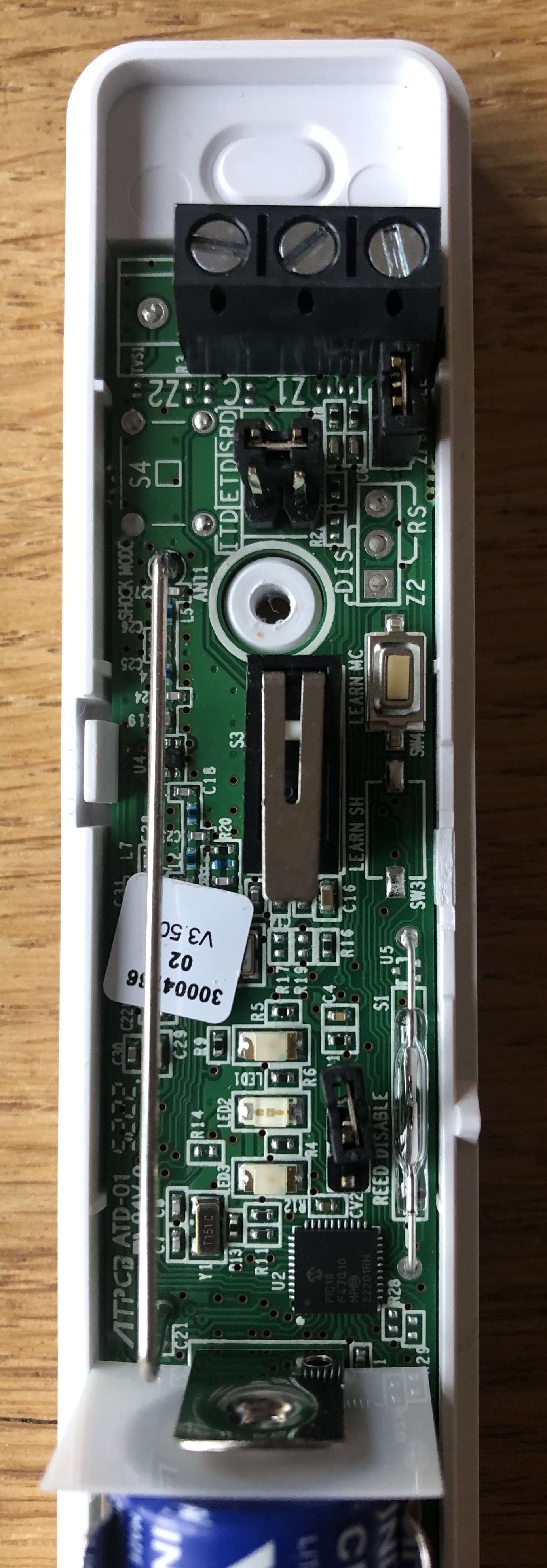
Hi, I'm trying to setup a new Pyronix MC1Z1-WE wireless sensor so that it uses a garage door NC reed switch attached to the external Zone, as well as functioning with the built-in mag contact on the other Zone. I can't access the installation instructions using the supplied QR code online as I'm an end-user and so can't get a Pyronix website account. I do have the installation instructions for the shock sensor version (MC1Z2-WE) and I was hoping the PCB/jumpers would be the same. It is roughly the same but my sensor is missing the 3-pin jumper to setup the external Zone input type (NC or double pole). What I want is: The MC1Z1 built-in mag contact enabled and on Zone 2. The roller shutter NC reed switched wired to Z1+C on the Zone 1 input terminal. block I'd expect to add/remove a jumper to enable the Zone 1 terminal? And from the shock-we instructions I'd expect to have to add/remove a jumper to define Zone 1 as a simple NC circuit? Can any of you friendly installers help with the jumpers I need to add/remove, or mail me the installation instructions for this sensor so I can read it myself? Thanks
-
Hi, I've just upgraded my Honeywell Accenta Gen3 to a Gen4. (Also fitted is an ADE Gen 4 Informa speech dialler.) In the Gen3 there was an engineer flag you can set (called "Program n to Report") so that part-set programs 2 & 3 don't report to the dialler (e.g. when using a part-set program at night I don't want it to dial my mobile when I forget to unset the system in the morning!). I've hunted high & low in the Gen4 documentation to find the same configuration but it seems to have been removed in the "upgrade"! Any ideas how I can prevent Programs 2 & 3 from communicating with the dialler?